Overload · single player & challenge mode
Robots that hunt you instead of waiting for you.
Ungodly Robot AI replaces the decision-making of every robot in Overload's campaign — memory, squad coordination, roles, real evasion, modular abilities and two-weapon loadouts. Getting it running takes two stages and about ten minutes. This guide walks both of them, with a way to check your work after each one.
The whole install, in one line
- Overload
- olmod 0.5.14
- Mod-UngodlyRobotAI.dll
- -modded
- F7
New in v1.3.0
Melee robots can hurt you again, and nobody flies into walls
Two real bugs, both of them fixed. If you are coming back from v1.2.2, this is the release worth taking — install it exactly the way you installed the last one, by copying the two files over the old ones. Your settings are preserved.
Clawbots did no damage at all
A melee robot's attack is not a weapon. ApplyClawImpulse — the call that
actually deals the damage — lives inside the movement routine this mod replaces, and the
same is true of the Blade robot's grind and the Detonator's blast. Every one of them was
flying around under this mod's brain with no way to hurt you.
They are now treated as contact attackers and left with their own attack logic, exactly as bosses already were, while still gaining this mod's senses, evasion and aiming. The three abilities that would fight a charge routine or fire a gun they do not have — Dash, Volley, Suppression — are withheld automatically.
Robots pressed their faces against walls
Three causes, mostly while searching. Destinations were taken on faith, so search points landed inside geometry routinely; a bad destination was only replaced once the robot got within six metres of it, which — if it was inside a wall — was never; and nothing noticed a robot going nowhere.
Destinations are now clamped to the last clear point along the way, candidates are scored on how far the robot can actually travel toward them, and a monitor watches real displacement. When local recovery fails twice the robot is handed back to Overload's own pathfinder for a couple of seconds, which routes it out of a corner far better than direct steering can.
Before you start
What you need
Three things, all of them free apart from the game itself.
01 Overload
A normal installed copy of the game from Steam, GOG, the Epic Games Store or the standalone build. Any 1.x version. Nothing about the base install has to change.
02 OLMod 0.5.14
The community mod loader. It is what makes plugins possible at all — Overload has no mod support of its own. Free, open source, MIT licensed.
03 An extractor
OLMod ships as a .zip, which Windows opens on its own. This mod ships as a
.rar, which it does not — you will want 7-Zip, WinRAR or PeaZip.
The shape of it
Two stages, four facts
Everything on this site is detail hung off these four sentences. If you already know your way around a game directory, this may be all you need.
Stage 1 Install OLMod
Unzip the OLMod package into the folder that holds Overload.exe and
Overload_Data. You then launch olmod.exe instead of
Overload.exe. Confirm it took by looking at the version banner in the top
right of the main menu.
Stage 2 Install the plugin
Copy Mod-UngodlyRobotAI.dll and UngodlyRobotAI.cfg into that same folder, then add
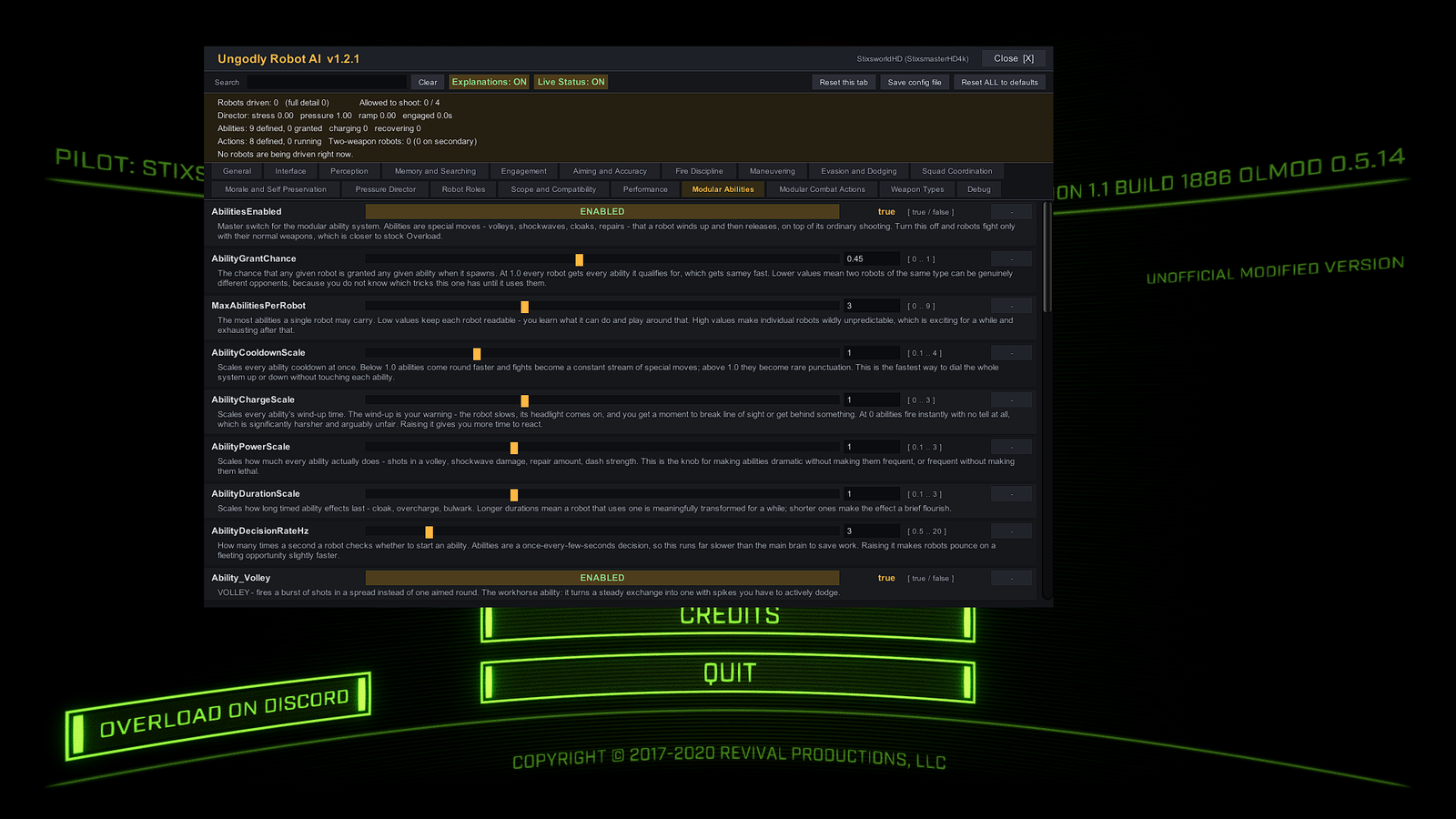
-modded to however you launch the game. Press F7 in game to confirm — the panel opening is the confirmation.
Track your progress
Install status
Every step on the two install pages carries a tick box. Ticking one updates the readout below, which is modelled on the live status strip the mod prints across the top of its own in-game panel.
Install status
0 / 7 complete
- S1 Overload directory located pending
- S1 OLMod extracted alongside Overload.exe pending
- S1 Version banner shows OLMod 0.5.14 pending
- S2 Mod-UngodlyRobotAI.dll in place pending
- S2 UngodlyRobotAI.cfg in place pending
- S2 Launcher carries -modded pending
- S2 F7 opens the panel pending
Nothing here is read from your machine — it is your own checklist, kept in this browser so it survives a page change while you work through the install.
What you are installing
A summary, before the detail
The full breakdown is on the what changed page. In short:
- Scope
- Single-player campaign and Challenge Mode. Multiplayer is off by default — Overload MP has no robots to improve, and other clients would not be running your settings.
- Method
- A Harmony prefix on
Robot.DoAIModes, loaded by OLMod as aMod-*.dllplugin. Movement still routes through the game's own physics; navigation is still the stock pathfinder. - Settings
- 175 of them, across 19 sections, every one
documented in place with its range, its default and a plain-English
explanation. Editable in game or in the
.cfg. - Safety
- Boss fights get enhancement only and campaign scripts win by default, so the authored moments in the campaign still play out. Both are switchable.
- Failure mode
- If the mod hits 40 errors it disables itself and hands the game back to the stock AI rather than flooding your log sixty times a second.